hey!! im akshat and this personal website has some things im working on and learning about
projects that ive done
interests and stuff i want to build
stock prediction ai
a market research project im building to study market data and find patterns in it.
im experimenting with things like market regimes and anomaly detection , so essentially it uses indicators as well as market news from around the world at very high frequency to find patterns in the market and predict movement , its a work in progress and im still learning and i wanna make it open source so others can learn too and contribute to it. im also trying to make it run on limited hardware like a raspberry pi or an old laptop so that it can be used by anyone without needing a powerful computer or a cloud server
local ai device
its basically an idea for a small device that can run ai locally on limited hardware like a raspberry pi or an old laptop or perhaps an esp32 or something like that. the idea is to make it small, cheap and power efficient while still being useful.
im mainly interested in making it small, cheap and power efficient but also useful so i was thinking about using it to run a small local ai model for things like basic stock analysis but somehting thats pretty sophisticated and can run on limited hardware this links with the other project i mentioned about stock prediction here
self hosted stuff
i run a small linux server for hosting things and testing projects.
mostly linux, docker and storing movies and shows and my minecraft servers!!
computer architecture
learning more about how computers work underneath the software
like how cpus, gpus and memory work and how they affect performance and efficiency mostly i learn this stuff by myself thru yt videos and reading books
hardware efficiency
looking at how hardware can do more without using a ton of power.
especially performance per watt and how hardware choices affect real workloads and how we can make hardware more effecient like i said before im tryna run a local ai model on an esp32 or a raspberry pi so im trying to learn how to modify the esp32 to make them more effecient (raspberry pi too!) and essentially make them run faster and better
ai and systems
learning about what happens when ai runs on actual hardware instead of just using an api
really interested in local models, limited hardware and the software behind them and ai in general how it works and how we can make it better
smart parking system
a smart parking system using an arduino (later an esp32), two ir sensors and a servo motor. it tracks how many parking slots are full or empty and displays the count on the arduino serial monitor. the plan is to later show it on a webpage hosted by the esp32.
smoke detector
a smoke detector using an mq-2 sensor. first, i used an arduino to show the presence of smoke in a room on the serial monitor. later, i connected it to the internet with an esp32, and eventually added a gsm module to send a text message to my phone.
breadboard console
a breadboard console built with an arduino, a 16x2 alphanumeric lcd (later replaced with a 2-inch oled display), a breadboard and a couple of buttons. i built two games for it, similar to flappy bird and crossy road. i plan to build more simple games that can run on an arduino, like a simple racing game or snake. right now, im working on a home menu where you can select games and settings, and adding sound with a simple piezo buzzer. for the hardware, ive finished designing a custom case and a pcb for it. this project is one of my personal favourites and one that ill probably remember for a long time since i love gaming too. all the resources for my project, like the pcb design, the .stl file and the code, can be accessed here.
simple antivirus
a very simple antivirus that uses hash matching with the virustotal api. it's pretty simple, but cool nevertheless. you can check it out here. it takes a file, calculates its hash and checks whether that hash is in the virustotal database. if it is, the file may be malicious; if it isnt, it hasnt been identified as malicious by that check. its a simple starting point for learning how antivirus software works, and it helped me understand the virustotal api and hash matching for detecting malicious files.
trading terminal
i developed a trading terminal which has a lot of features, including:
-
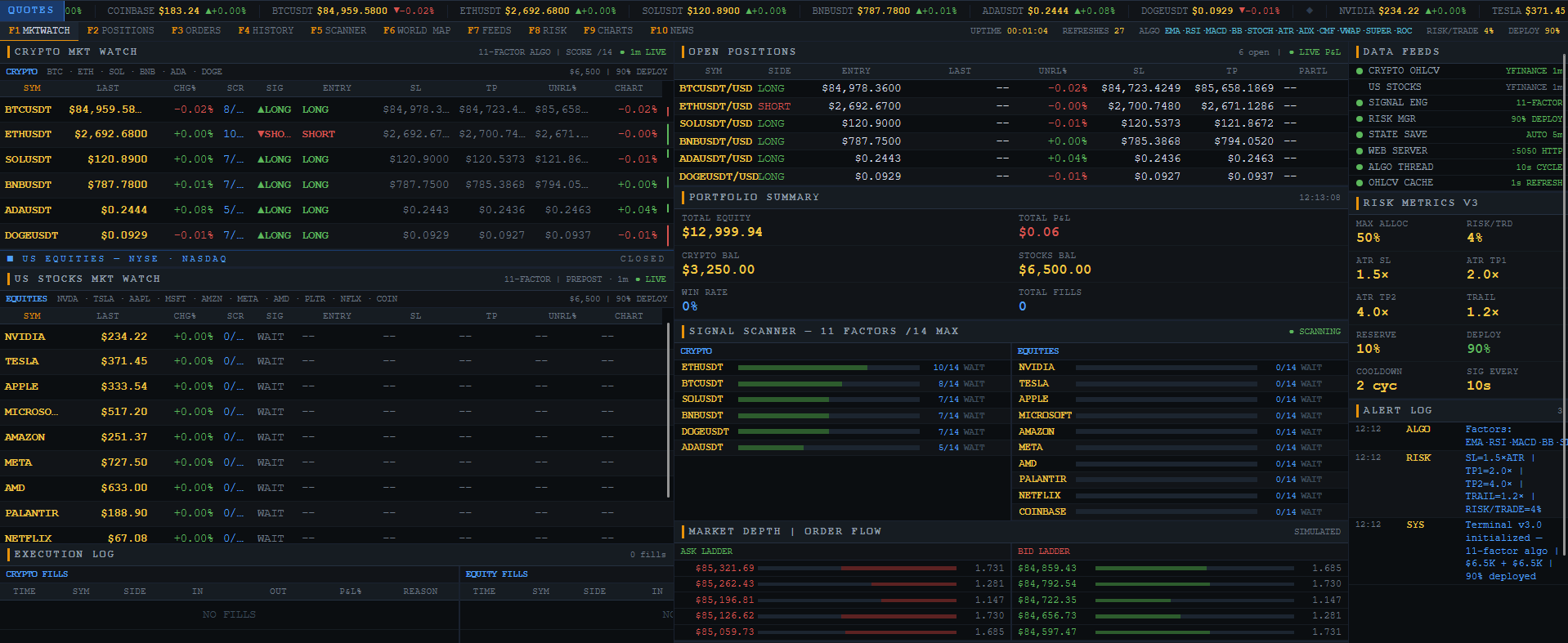
marketwatch: the default screen where the terminal starts. it monitors crypto coins like btc, sol, ada, doge and eth, tracking current price, algorithm score, signal, entry price, stoploss, takeprofit, unrealized p&l and a mini graph. it also tracks us stocks such as nvda, tsla, appl, msft, amzn, meta, amd, pltr and nflx. this screen also displays open positions, portfolio summary, signal scanner, order flow, account info, scrolling ticker prices and alerts.
-
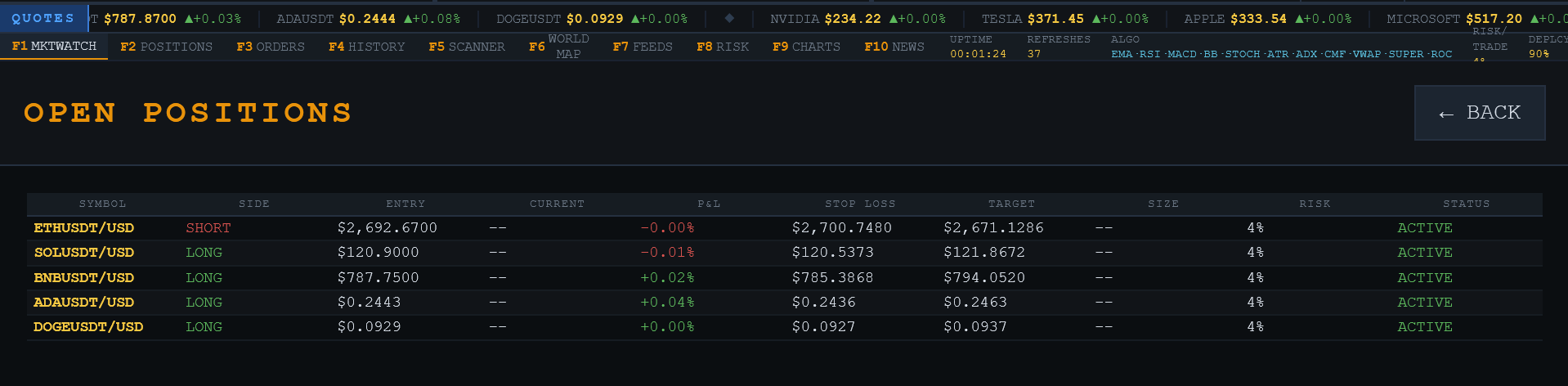
positions: shows the symbol, side (long/short), entry price, current price, p&l, stoploss, takeprofit, target and size of trades.
- orders: shows a list of executed trades and pending orders. this feature is not fully implemented yet.
- scanner: finds assets with the strongest trading signals, separates crypto and equities, and displays active signals.
-
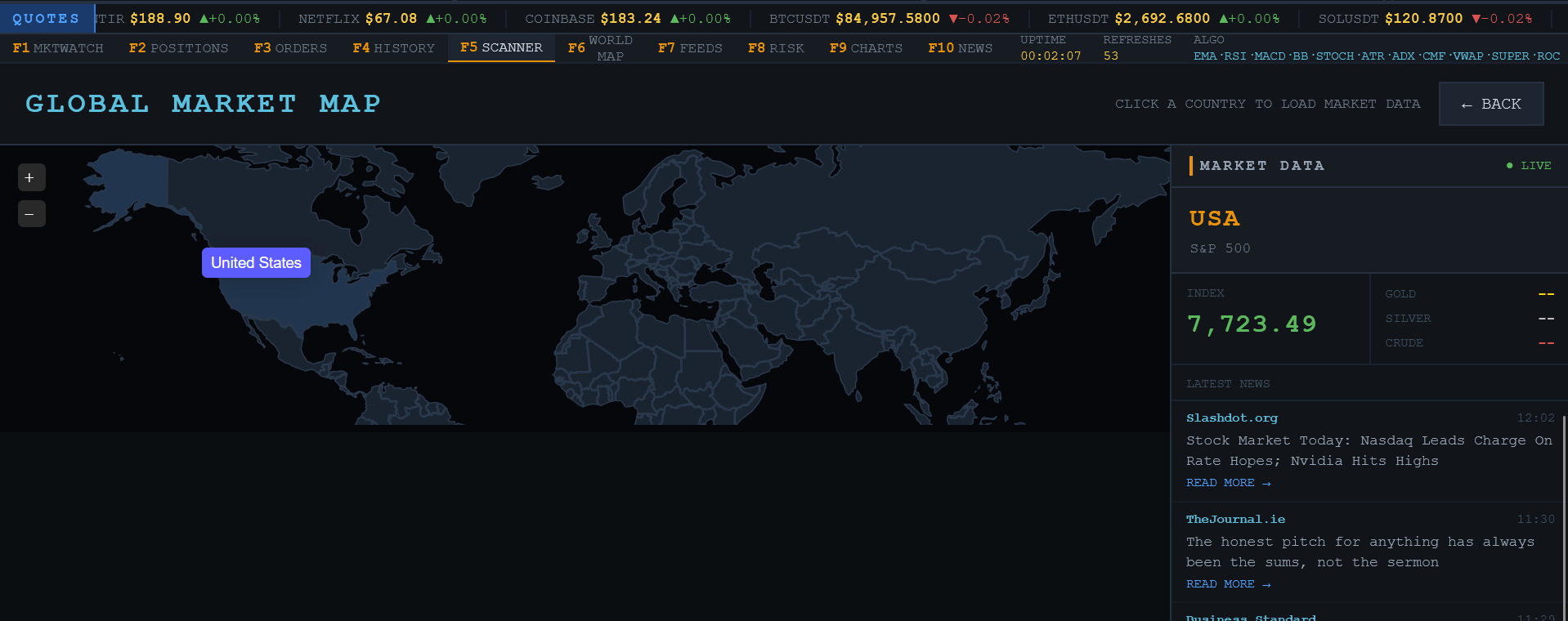
world map (personal favourite): opens a dedicated interactive world map built with jsvectormap. you can select countries to load market information, including the major stock index and its price, gold price, silver price, crude oil price and, most importantly, recent local news.
- feeds: shows the status of all internal data and services.
- risk: displays the risk profile, including risk per trade, capital deployment, reserve capital, stoploss, takeprofit, trailing stop and position exposure. this section is still being built.
- news: a specialized section for news articles from around the world.
this project uses python and the following libraries: yfinance, websockets, requests, pandas and rich, and also many standard libraries including asyncio, time, msvcrt and so on.
you can access the documentation here.
b4usend — Message Analyzer Extension
Its a browser extension that checks how your messages might come across before you send them.
What is b4usend?
Have you ver typed out a message and wondered if it sounds rude, too aggressive, or like just not the way that you meant it?
So that's why I made b4usend
It's basically a browser extension that looks at the way a message is written and then tries to figure out its tone before you send it and it checks things like politeness, friendliness, frustration, hostility, urgency, sarcasm, and a bunch of other communication signals.
so the main thing I wanted to avoid was making something that just looks for certain words and immediatelyjust labels a message based on them because like context matters, and the same sentence can come across completely differently depending on how it's used.
Also like , everything runs locally in the browser and your messages aren't sent to an external API or some server for analysis cos privacy always comes first :)
What can it do?
Analyze messages when you're typing
Detect around different communication signals
Look at context instead of relying entirely on keywords
Give each analysis a confidence score
Use a fallback analyzer when needed
Work with text inputs, textareas, and content-editable elements
Run locally without needing an internet connection for the analysis itself
Work with Chrome and other Chromium-based browsers
The signals it checks include politeness, warmth, friendliness, hostility, frustration, irritation, pressure, urgency, blame, accusation, sarcasm, teasing, directness, formality, casualness, emotional intensity, ambiguity, positivity, and negativity.
Getting started
so ou'll need node.js and npm installed.
Clone the repository then open a terminal in the project folder, and run:
npm install
npm run build
when the build finishes:
Open
chrome://extensionsin Chrome.Enable Developer mode.
click Load unpacked.
Select the
distfolder created by the build.
That's it!!! :) You should now be able to use the extension!
if you wanna make changes to the source code, you can run npm run build again to rebuild it.
How does it actually work?
The main analyzer is in src/analyzer.js.
I went with a rule-based approach because I wanted the extension to be pretty lightweight and fast and easy to work on instead of depending on an external service.
but like it's not meant to be a basic keyword detector.
The analyzer looks at different parts of a message together like
Context: The words around a phrase can change its meaning
Negation: A message saying someone isn't angry shouldn't automatically be flagged as angry
Sentence structure: The way a sentence is phrased can affect how it comes acros
Hedging: Words that make a statement less certain or soften the way something is said
Punctuation: Things like repeated exclamation marks can affect the perceived intensity of a message
Capitalization: Excessive capital letters can sometimes indicate emphasis
Conversational style: A casual message and a formal message shouldn't necessarily be judged in the same way
All of these things contribute to the analysis. One word on its own shouldn't be enough to decide exactly what a person means.
like for example, being direct doesn't automatically mean being rude right? Similarly, a message containing an angry-sounding word isn't necessarily hostile.
The goal is basically to make the analysis more useful without pretending it can understand every message perfectly.
The signals
so here's what the analyzer currently looks at:
| Signal | What it means |
|---|---|
| Politeness | How polite or courteous the message sounds |
| Warmth | How caring or considerate it comes across |
| Friendliness | How friendly and approachable it sounds |
| Hostility | Whether it comes across as aggressive or antagonistic |
| Frustration | Signs of impatience or dissatisfaction |
| Irritation | Whether the message sounds annoyed |
| Pressure | Whether the message pushes someone to do something |
| Urgency | Whether something sounds time-sensitive |
| Blame | Whether responsibility for something is being assigned |
| Accusation | Whether someone is being accused of doing something wrong |
| Sarcasm | Whether the message might have a sarcastic meaning |
| Teasing | Whether someone is being playfully teased |
| Directness | How directly the message gets its point across |
| Formality | How formal the language is |
| Casualness | How informal the language is |
| Emotional intensity | How strongly emotions are expressed |
| Ambiguity | How unclear or uncertain the message is |
| Positivity | How positive the message comes across |
| Negativity | How negative the message comes across |
Each signal gets a value between 0.0 and 1.0.
0.0means that the signal wasn't detected.0.5means the signal is present to a moderate degree.1.0means the signal is strong.
The analyzer also gives a confidence score between 0.0 and 1.0whcih represents how reliable the overall analysis is expected to be.
These values aren't suppoesd to be absolute judgments about what a person intended , they're estimates based on the message itself.
Using the analyzer
The main analyzer is available in src/analyzer.js.
for example:
```javascript
import { analyzeMessage } from './src/analyzer.js';
const result = analyzeMessage(
'Can you send me the report?'
);
console.log(result);
```
The extension can also expose the analyzer globally when loaded in the appropriate extension context:
```javascript
window.b4usendAnalyzer.analyzeMessage(
'Can you send me the report?'
);
```
The result contains the detected signals and the confidence score.
also make sure the import and function names match the exports in your current version of src/analyzer.js.
Why not just use an ML model?
I did actuallt consider using a small machine learning model at first but I wanted to start with something that was fast, lightweight, and didn't need to download a model or send anything over the internet.
Using rules also makes it easier to understand why a signal was triggered and change the logic when something doesn't rly work as expected.
The main reasons for going with this approach were:
Privacy: Messages stay on the device. (most important)
Speed: Analysis doesn't depend on network requests.
Control: The rules can be adjusted as the project improves.
Debugging: It's easier to figure out why a particular result was produced.
Offline support: The analyzer doesn't need an internet connection.
i know a rule-based system has its limits but the point isn't that this approach is perfect ,it's that it makes sense for a lightweight browser extension where privacy and speed are most important.
Performance
The analyzer is designed to be fast enough to run while you're typing, without making the browser feel slow
The current reported performance figures are:
Initialization: around a 100 ms.
First analysis: around 30 ms.
Subsequent analyses: around 15–50 ms.
Typing debounce: 500 ms.
Target memory usage: under 5 MB.
but these figures should be treated as benchmarks rather than guarantees cos actual performance depends on the device and browser.
Privacy
This is one of the main things I wanted to get right.
b4usend is designed to analyze messages locally, without sending their contents to an external service.
No external API calls for message analysis.
No sending message content to a remote server.
No built-in analytics or tracking.
No internet connection required for the core analysis.
The extension is intended to work without your messages leaving your device for analysis.
Testing
To run the tests, use:
```bash
npm test
```
the test suite covers basic functionality, contextual understanding, edge cases, relationships between signals, and performance.
The existing test report indicates that the requirements tests, contextual tests, signal relationship checks, and performance benchmarks passed , uou can run the suite yourself to verify the results against the current code.
Limitations
b4usend isn't going to get every message right(for now), and that's something i wanna be clear about.
A lot of communication depends on things that aren't present in a single message.
For example:
Sarcasm: It's often difficult for a rule based algo to tell whether someone is being serious without knowing the conversation.
Cultural differences: The same phrase can mean different things to different peoplein different places
Short messages: Something like "okay" doesn't rly give the analyzer much to work with
Irony: It's not always easy to distinguish irony from sarcasm
Technical language: Unusual wording or like industry-specific terms can affect the results too
False positives: Some messages will inevitably be interpreted incorrectly
That's why the analyzer uses confidence scores and tries to be conservative when the context isn't clear.
It's there to give you another perspective on a message, not to tell you exactly what someone thinks or how they're going to react.
so what's next?
Theresa few things I'd like to explore as this project develops:
Trying to use a small local ML model to improve contextual understanding
Letting the users adjust how strongly different signals are weighted
Adding a conversation history so earlier messages can provide more context
Tuning the analyzer for different situations, such as professional emails and casual conversations
Adding support for more languages
these are some cool ideas i wanna try out later
Try it out!!!!
You can also check out the web pages for b4usend which are hosted on vercel
Popup — Open the popup interface which is essentially the analyzer in a html form
Options — Open the options page which lets you toggle around with settings
Finally
The idea behind b4usend is pretty simple: sometimes it's not just about what you say, but how you say it.
I wanted to build something that could help pick up on that without making the whole process complicated or slowing things down or compromising privacy
It's still something that can be improved definietly but this is the approach I'm taking with it for now
Built with JavaScript, contextual rules, and a focus on privacy.
try download it click here